Mozilla has introduced a new control in its Firefox web browser that allows users to completely disable generative artificial intelligence (AI) features with a single toggle. This change reflects growing concerns about privacy, data usage, and user autonomy as AI capabilities become more integrated into mainstream software.
The new control mechanism is part of Firefox version 148, scheduled for general rollout on February 2, 2026. It gives users unprecedented control over how — and whether — AI features influence their browsing experience.
Why This Change Matters in 2026
Web browsers have evolved far beyond simple page renderers. They now integrate features powered by artificial intelligence such as translation services, predictive suggestions, and embedded chat assistants. While these additions aim to enhance usability, they also introduce privacy and security considerations.
Many users and privacy advocates have expressed concerns that AI mechanisms could collect, process, or transmit personal data in ways that are unclear or difficult to control. In response, Mozilla’s latest feature makes it easier for users to opt out of all AI-related functionality without navigating multiple settings menus.
This evolution reflects a broader industry trend — users increasingly demand transparency and control over AI-driven components in software, especially when data collection or external communication is involved.
What the One-Click AI Control Does
With the new control section in Firefox settings, users can:
Turn off all AI enhancements with a single toggle
Manage specific AI features individually
Prevent prompts or reminders for AI tools
Block future AI features from activating automatically
The control covers AI functions such as:
Automated translation features
AI-assisted PDF alt-text descriptions
AI-enhanced tab grouping
Link content summaries
Integrated chatbot panels using third-party AI services
Technology and Privacy Implications
User Autonomy and Data Flow
AI features may rely on data processing to tailor results, make suggestions, or automate tasks. While this enhances convenience, it also raises questions about how much metadata or behavioral signals are being processed and where such data might be sent.
This latest toggle does not necessarily stop all technical telemetry or background data flows (such as crash reports or usage metrics), but it does significantly reduce the potential footprint of AI components that may interact with external services.
Security and Attack Surface Reduction
From a cybersecurity perspective, disabling optional AI features can have real benefits beyond privacy:
Reducing reliance on external API endpoints that may become vectors for malware or phishing campaigns.
Limiting browser code paths that handle generative predictions or automated content.
Decreasing the likelihood of unintended data exposure through machine-generated suggestions or summaries.
Though not a substitute for comprehensive endpoint security controls, giving users the option to disable AI reduces the browser’s attack surface in environments where strict data governance is required.
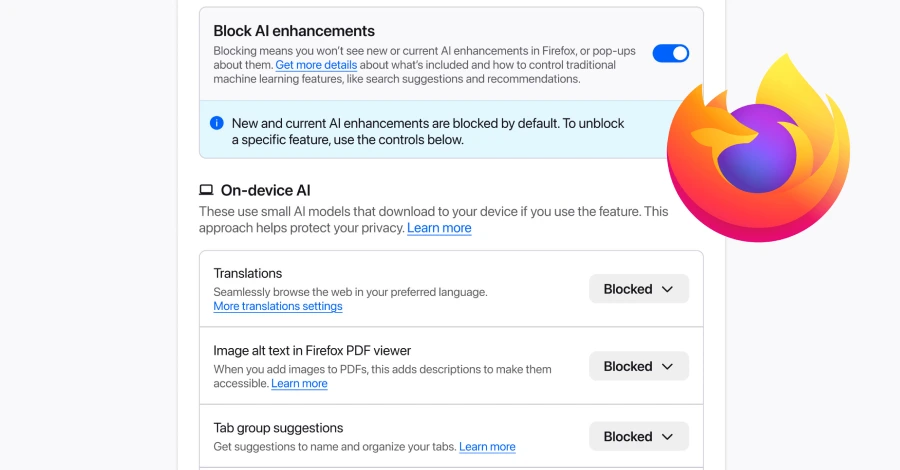
How to Turn Off AI Features in Firefox
Once Firefox 148 is installed:
Open Settings in Firefox.
Navigate to the AI Controls section.
Use the Block AI Enhancements toggle to disable all current and future AI functionality.
Optionally, adjust individual AI feature switches based on personal or organizational preference.
These settings allow users to balance convenience and privacy according to their security posture or compliance requirements.
When Users and Organizations Should Consider Disabling AI Features
Although many AI enhancements are designed for convenience, there are specific scenarios where turning them off may be beneficial:
Enterprise environments with strict data classification policies
Government or regulated industries where browser-initiated communication needs to be limited
Security-conscious users who prefer minimal external service interaction
Applications handling sensitive data where additional AI processing could create compliance issues
By controlling AI features at the browser level, organizations can align client configurations with their broader cybersecurity and privacy standards.
Conclusion
Mozilla’s one-click AI control in Firefox is a noteworthy advancement in giving users greater agency over emerging browser capabilities. As AI continues to be embedded into everyday applications, transparency and choice will play central roles in maintaining both privacy and security.
For users who prioritize data control, minimal external communication, or reduced attack surface, this option in Firefox 148 represents a useful evolution in browser privacy settings.